
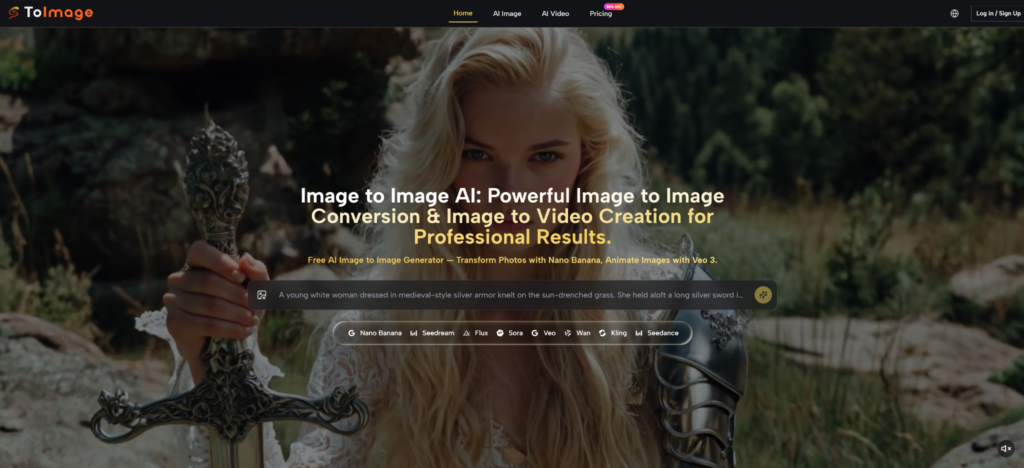
The conversation around AI image tools has quietly shifted. A year ago, the debate was about whether AI-generated visuals were good enough. Today, the more practical question is which model handles which creative task better — and whether switching between tools mid-project kills more time than it saves. That friction is real, and it is the exact problem that brought Image to Image onto my radar. The platform does not bet on a single proprietary model. Instead, it aggregates a roster of leading models — Nano Banana, Flux Kontext, Seedream, Veo 3, Kling, and others — and organizes them around a transformation-first workflow that starts with your existing visual assets rather than a blank prompt box.
The premise is worth taking seriously: if your creative output depends on maintaining visual consistency across a campaign, a character series, or a product line, bouncing between five separate tools is not just inconvenient — it is a structural problem. A platform that consolidates those models under one upload workflow has an argument to make. Whether it makes it well is what I set out to find out.
The Model Roster as a Creative Decision
Image Models Organized by Task Type
Transformation Versus Surgical Editing Are Not the Same Job
The image side of the platform surfaces two meaningfully different tool types that get conflated in most discussions of AI image generation. Nano Banana and its second-generation variant are built for transformation — you feed them a source image and they produce a reimagined version that can shift style, aesthetic, atmosphere, or subject treatment dramatically. The multi-reference input (up to four images simultaneously) is the feature that separates this from standard single-prompt generation. When you need character consistency or brand-visual coherence across multiple outputs, the ability to anchor a generation to more than one reference is not a luxury — it is a workflow requirement.
Flux Kontext operates differently. It is designed for context-aware surgical editing: change the text inside an image, swap a background element, modify a specific object without disturbing the surrounding composition. In my testing framework, this distinction matters enormously for e-commerce and product content work, where you need to alter one thing precisely and leave everything else intact. Lumping these two capabilities under “image editing” undersells how differently they behave and when each one earns its credit cost.
Seedream fills the third role: speed-optimized generation for iteration-heavy workflows where you need to explore many directions quickly rather than perfect a single output.
Video Models and the Native Audio Differentiator

Veo 3 Changes the Expectation for Image Animation
Most image-to-video tools produce motion. Veo 3 produces motion with natively generated audio — synchronized dialogue, sound effects, and ambient audio produced from the visual content itself. From a practical user perspective, this closes a production gap that has required a separate audio layering step in nearly every other image-animation workflow. Whether that gap was painful depended on your use case, but for social video content where audio is not optional, the integration is structurally meaningful.
Kling, Seedance, Wan, and Runway Gen 4 round out the video options, giving users access to different motion aesthetics and generation characteristics within a single session rather than requiring separate platform accounts for each.
Getting Into the Workflow: What Actually Happens
Step 1: Orient Toward Image or Video Before Uploading
The Platform Separates These Paths With Purpose
Navigation splits cleanly into AI Image and AI Video sections. This is not cosmetic — it determines which models load and how the prompt interface is structured. Choosing your output type before uploading sets the generation context correctly. Users who skip this orientation and treat the platform like a unified prompt box tend to generate more misfires early on.
Step 2: Upload Your Source Asset and Build a Structured Prompt
Prompt Architecture Is the Real Skill Investment
The upload step is instant. The prompt step is where results diverge. In my testing, the homepage example prompts are worth studying before writing your first real prompt — they demonstrate a consistent structure: subject description, material and texture detail, lighting conditions, color palette, compositional notes, atmosphere, and technical output specs. Users who match that level of specificity get results that are meaningfully closer to intent on the first generation. Users who write five-word prompts and expect the model to fill in the rest will iterate more and understand less about why outputs differ.
The multi-reference input with Nano Banana adds a layer of control here — feeding style references alongside subject references gives the model clearer constraints and, in practice, appears to reduce the variance between generations in a series.
Step 3: Run, Review, and Decide Whether to Iterate
Budget Your Credits Around Model Cost Differences
Each model carries a different credit cost, and that cost is worth factoring into how exploratory you allow yourself to be. Nano Banana and Flux Kontext sit at moderate credit consumption. Veo 3 video generation is the highest-cost operation on the platform. The practical implication: image work is relatively forgiving for iteration; video generation rewards more careful prompt preparation before committing. Credit balances roll over on paid plans, which reduces pressure to exhaust a monthly allocation before it resets.
Scenario Testing: Three Use Cases, Honest Assessments
Brand Visual Series With Character Consistency
This is where the multi-reference architecture earns its case most clearly. For a recurring character — a mascot, a spokesperson concept, a product placed across seasonal campaigns — maintaining consistent proportions, lighting treatment, and stylistic feel across twelve or twenty outputs is the core challenge. The four-reference input lets you load character reference, style reference, lighting reference, and context reference simultaneously. It appears to anchor outputs more reliably than single-reference or pure-prompt generation, though results may still vary with complex source material and the consistency is not mechanical — it is probabilistic.
Product Image Editing for E-Commerce
Image to Image AI surfaces Flux Kontext specifically for this territory. The context-aware editing capability — targeting a specific object, background zone, or text element without destabilizing adjacent composition — is practically useful for product imagery where the product itself must remain untouched while surroundings change. In my assessment, this works most reliably when the edit target is spatially distinct in the frame. Edits that require the model to infer boundaries between closely adjacent elements — product edge against a similarly colored background, for instance — require more iteration.
Animating Hero Images for Short-Form Video
The image-to-video workflow with Veo 3 has a clear audience: creators who produce still content as their primary output but need to meet platform demands for video. Rather than rebuilding a scene for motion from scratch, you upload an existing hero image and describe the motion behavior you want. The native audio generation means that output arrives with a synchronized audio layer, removing one post-production step. The honest limitation: precise motion control over multiple subjects or complex physics interactions is harder to achieve than simple single-subject animations. Expectation calibration here prevents frustration.
Platform Comparison: Where This Approach Stands
| Dimension | Single-Model Generator | Multi-Model Aggregator | This Platform’s Approach |
| Model access | One model per tool | Multiple via separate accounts | Multiple within one workflow |
| Reference image input | Typically one | Varies | Up to four simultaneously |
| Image and video in one session | Rarely | No | Yes |
| Native audio in video output | Not standard | Not standard | Veo 3 includes it |
| Credit-based cost management | Varies | Not unified | Unified credit system |
| Prompt complexity required | Low to moderate | Varies | High for consistent results |
Limitations That Affect Real Sessions
Output quality scales directly with prompt quality. This is not a caveat unique to this platform, but it is more consequential here because the model roster is broad — without clear prompting, the system has more degrees of freedom to produce outputs that diverge from intent. New users should expect a learning period measured in sessions, not minutes.
Multi-reference input introduces its own complexity. Four reference images do not always combine predictably, particularly when their visual languages conflict. Starting with two references and adding more once the model’s behavior is understood produces better early results than loading all four from session one.
Video generation is the most resource-sensitive operation on the platform. Complex scenes, rapid motion, or scenes requiring accurate physical simulation are harder to control and may require more iterations than simpler animations. Results are not guaranteed to be consistent across identical prompts.

The Clearest Use Case for This Structure
The platform is most valuable to users who are already deep enough in visual content production to have a reference library — brand assets, character sheets, product photography, campaign visuals — and who want to extend that library without rebuilding scenes from zero. The transformation-first workflow assumes something exists to transform, and it rewards users who bring structured source material and invest in prompt quality.
For occasional or exploratory users generating one-off images without a reference context, the credit system and prompt investment may feel like overhead compared to simpler tools. The value proposition compounds with use — the more consistently you bring organized references and structured prompts, the more reliably the model roster returns results that serve a real production workflow.